Minding the (Analog and Digital) Gap
One of the worst afflictions to have is the ability to argue with yourself into oblivion. I’ve done that exact thing on the least important of all subjects: note-taking. Well, I don’t believe note-taking is useless, but given the sort of renaissance on the topic, I know I am not the only one. For instance, what to do about the seeming GAP between taking analog or digital notes?
Some choose the extreme. They go “all in” on either paper or digital tools, others, (and I believe is the majority) frequently cycle through note-takings current and past technologies and (hopefully) just choose the ones they need the most in their situation. I am unfortunate enough to go down the many, many rabbit-holes—it is practically a burrow—on how to take good notes on a variety of mediums, for a variety of purposes. Some good authorities on the matter are actually paper-enthusiasts—@Annahavron who runs the blog Analog Office, and Rachelle from Rachelle in Theory who has a course I wish I could spend money on just for the curiosity of it. I find the advice I learned from them to be solid in understanding this gap, but leaves me with some questions. Especially when that gap between digital and analog is not so “obvious.”
Three Steps to Mind the Gap
Step 1) Its a Brainstorm, not a Brain-Dribble
I believe Rachelle is right when she so often talks about working through something on paper first. In a more recent video titled “Paper for Thinking, Digital for Storage”, Rachelle says that it may just be best to use paper for any initial ideas or plans. Digital is good for storage. I agree actually. I tend to brainstorm by handwriting, either in my Traveler’s Notebook or in my E-notebook, the SuperNote Nomad. Havron suggests something similar, where she suggests using digital tools for finite things, and paper based tools for seemingly infinite things. For example, paper for brainstorming an idea, the limits of the page makes us think deeper on the task. Digital is great for keeping things you know are happening, like a calendar appointment, or due dates on projects. Things like that.1
While these posts from Havron and Rachelle in Theory are more recent, I myself have only come to the realization after (literal) months of rumination, that the best way is the one with least resistance. For example, I use my Nomad to take meeting notes for work. Once done, I go over these notes and create a list of to-dos, reminder’s, etc. in my task management app. I then erase these notes once I’ve processed them. I do this because I hated taking these important notes on analog paper, and I could never parse what I meant, this process leaves less paper wasted and makes me process my tasks to then get on with my work projects.
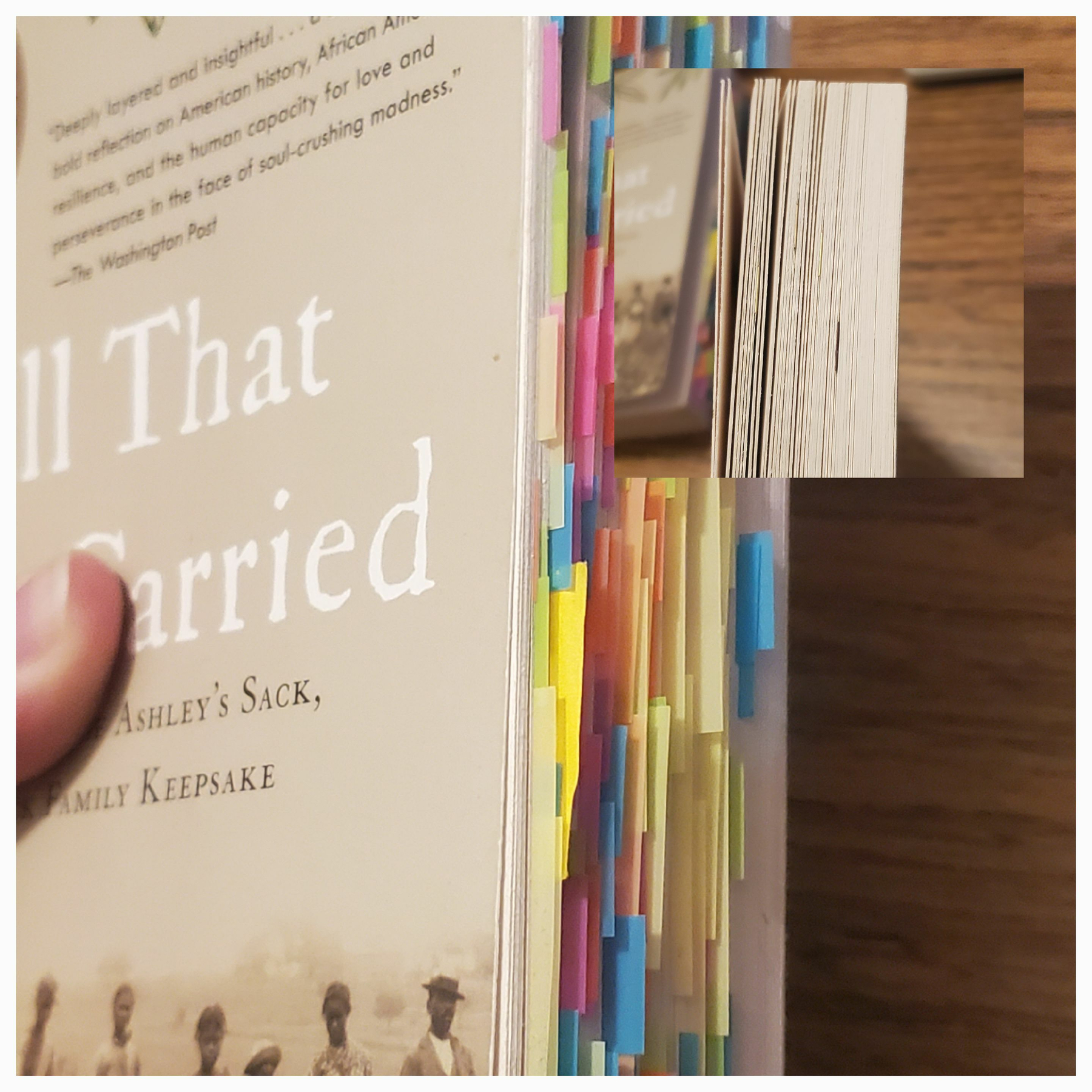
Another example is my reading notes. I take my reading notes on the Nomad because it is often for my seminar classes. Even if I do not read the book in full, I have lots to say anyways, because I can better remember key terms, examples, and arguments with this system. Before I used to use MANY colored tabs, I’ve endearingly called my most favorite books my colorful porcupines because of this. Now, I just mark the chapters with BookDarts, and annotate with pencil in the margins, and put most of my own thoughts in the new (.note) file on the Nomad.
Step 2) Simplicity, Simplicity, Simplicity
If I were to sum up most of my troubles, it is not knowing what simplicity “actually” means. Simplicity is the path with the least resistance. Meaning purposefully choosing the method in which I know just works. The beauty of this step is that it is inherently individual to everyone. We all do things in a particular way, no need to change it, if it works!2
If you know what “#RS" or “#LR” means in your notes, do not change it. If you require a new obsidian vault for a new project, do not listen to everyone who says you need “one vault.” Same for notebooks. Do the bare minimum you need to keep going. No need to “revamp” the system. If anything, it means you may be avoiding the tasks you must do. I am a master at this secret technique called “But what if…" I am now trying to be good at “I might as well…"3
There are many “options” out there that make us feel as though we may not be getting things done fast enough or aesthetically enough. I love experimentation, but, experiments are best done when there are few variables.
This step is to keep the “woops I collect [insert stationery/electronic item] now” kind of mentality. Get creative, and have fun with the things you do have, and do trial runs at appropriate times. Ask your friends (better if in person!) how they go about doing things.
I asked some of my friends in seminar how they take reading notes, one of them kept a separate notebook and I was intrigued but also thought it may be a waste of time. Now that I have tried it out, the extra amount of time writing out important sentences plus my own thoughts, is worth it for how much more I get out of these dense historical works. While I miss my colorful porcupines, I have changed my annotating to reflect the more confidence I have now as a historian in training.
Step 3) When in Doubt, Write it Out
If your keyboard is right there, use it. If there is pencil and paper, use it. The beauty is that you can just move the notes where they can be more convenient later. I’ve learned this while I was experimenting with too many variables, and it helped me figure out in the end, where I should try and take notes or do certain tasks. If there is a fundamental flaw in the system, just putting it down is the first step to understand what you might be able to change to make the next time easier.
I have a bad habit of wanting to fix something the moment I think it is broken, thus derailing what was going to be a two hour reading session or work session to a “tinkering” one. I still struggle with this, but, I’ve become so busy that doing this would make me fall wayyyy too behind. To tell my brain I know it is screaming at me, I use the “someday maybe” list I have digitally in my task management app, and put it in there, maybe with a due date to review at a time I know I will not be as busy as I am currently. 4 So, write it out, then ask yourself if it really needs addressing NOW, or if this is a limitation you must deal with.
E-CODA
This brings me to the ambiguous “gap” between analog and digital tools, E-ink or E-paper technology. While most people know about e-readers such as Kindle, Kobo, Pocketbook, Nook, etc. Many don’t really know about its e-notebook counter part. At least, not six years ago when I got my first one. E-ink is ambiguous because it is digitally-born and my handwritten notes become digitally born as well—thus—easier to integrate in many workflows that require an end product to be, digital. There are some things it cannot beat paper at, such as its physicality, which allows for permanence and privacy that is unmatched. I use these e-ink tools to produce work that will be digital anyway. I personally hardly use it for anything I deem a hobby or creative. 5 But, I’ve only realized that with trial and error, there aren’t many digital and analog uses of e-notebooks promoted online. In-fact the SuperNote website has a revolving animation that suggests it can replace your: sketchbook, planner, journals, and notebooks. For myself, that didn’t work. So, how do I use this niche technology that is an e-notebook?
- To take class or reading notes
Why? I hate fussing with stationery when it comes to notes I would like to reference later on. I would get distracted with ink bleeds, smudges, and god forbid, my notes getting out of order during a lecture. With reading notes, I can attach my handwritten PDF in my reference manager of choice and have it synced and easy to reference wherever I may be working. No need to scan pages.
- To experiment
Why? Because hoarding stationery is a hobby of mine I am trying to not indulge in anymore. I can experiment with certain layouts, systems, etc. without having to spend more money, just to abandon it (such as the hobonichi layout). One big caveat is that e-ink products are expensive tech, so who is saving money, really?
- To take a break for my eyes and back
We know why. I look at screens often, and being able to read a digital book (on my Note Air 3C) natively in the Zotero application, is a life saver. The same thing applies to the notebooks I carry. I now carry only two notebooks, a Traveler’s Notebook and one in the passport size.6 The rest find a home on my SuperNote Nomad.
I think the expense of time and money in reshaping how e-ink fits into how I work made me feel that they had to completely replace all paper I will ever use. That is simply not the case. It is a luxury to be able to use them, not a requirement, but I do think of them as indispensable to the work I do. They help me mind the gap.
How do you mind the gap?
-
Anna Havron, Reader Question 10: Personal Productivity Analysis Paralysis, Analogoffice.net. analogoffice.net/2025/08/2… Accessed, 28 Jan 2026. ↩︎
-
Anna Havron, Reader Question 1: Paper as a Read Later App?, Analogoffice.net Accessed, 30 Jan 2026 Havron echoes this in various places on her blog, but the very first “reader question” does a good job summing it up! ↩︎
-
Check out these videos here about this! How to Manage Multiple Interest - Odysseas and Time Management - Amy Wang ↩︎
-
And let me tell you, I am booked out till August, lol. But, do look into David Allen’s “Getting Thing’s Done” it is “tool agnostic” and beyond helpful for me! ↩︎
-
When I do have some creative inspiration, with nothing else on me, I’ll just migrate out whatever I wrote in the one physical notebook I keep everything. ↩︎
-
I may do a post about them in the future. ↩︎