How I Use E-Ink for Non-Fiction Writing: Reading, Research, & Note-taking
In a previous post I go into the digital and analog gap that comes with our contemporary and integrated lives. This post will go more in-depth in how I use E-ink for non-fiction writing. Non-fiction writing often requires reading, research, and note-taking. This is personally how I go through the process as a humanities based writer and researcher. As said in another post, I think it is much more important to discuss how we use technology and not just reciting its “specs.” With that said, some E-ink notebooks and readers are better for some people than others. This is just what I personally use and will note why I suggest some over others. Nonetheless, lets start where the magic usually begins: Reading.
Reading is Writing
Reading is something I do basically every day, whether for my own personal research, for my seminar classes, for this blog, or for fun. My first preference is actually paper books. The technology of print books is unmatched and cannot be adequately replicated in the digital world. Besides this, I have two primary E-ink readers I like to use. My Kindle Paperwhite ( PW, 10th gen—modded) and my Onyx Boox Note Air 3C (NA3C). My Kindle PW is perfect for leisure or night reading, it has great battery, and can dual-boot KoReader with the native OS. It is durable and reliable for academics since unfortunately, Kindle has a monopoly on eBooks. My university has access to a decent number of PDF eBooks that I sync in Zotero. For these, I use my NA3C since I can go into the Zotero app and read and highlight in the app. This has saved me money in more ways than one, and means I get a copy I can actually annotate, unlike library loans. Below is my preference of type of reading material and then what I use to take notes on that reading.
- Physical book I own and pencil
- Physical Library book loan and my SuperNote Nomad
- Ebook PDF on NA3C in Zotero App
- Ebook Kindle/Epub on NA3C in Kindle App
- Ebook Kindle/Epub on Kindle PW
- My laptop with Zotero or Kindle Web browser (absolutely if I must)
Notetaking is Writing
“Notetaking is writing.”1 The best notes are really the ones that engage the text, active reading is writing too, in a way. And that is all thanks to having a pencil in hand. When I read, I try to mark and engage the text as much as possible. I have troubleshooted many different ways to do it, but the best way is choosing the more reliable path. For instance, the NA3C has the option to sync with your Zotero library, where you can download the PDF, mark it up in the native app called NeoReader, and then send it back out. Unfortunately, it has some hiccups for me that I do not like dealing with. So, I now just use the official Zotero app on the NA3C and use the “handwrite to text” feature instead of the on-screen keyboard. I still get to write by hand my notes and get to search those annotations in Zotero. This is my simple and reliable path. This may not work for monochrome E-ink displays due to the Zotero app not telling you what color it is you are using, which is important to how I work.2
Reading Notes
Another reliable way to take notes, especially when reading, is to keep these reading notes in a separate place. For me, that means using the SuperNote Nomad to create a note file for just that book. This could also just be done on analogue paper. I believe this is the most engaged way to take notes on a book, especially a physical book you are borrowing and cannot mark. I write out important quotes, summarize points, and paraphrase. All the while I note the page number (or chapter/section if an Epub). I always felt the most prepared in my seminar classes when I do this.
Lecture Notes
When taking notes for lecture based classes, they are most useful to me as E-ink notebooks. There are two reasons for this. One, if the class is interesting, I want to reference these notes anywhere I am. Two, I don’t have space to physically keep these notes, nor do I want to deal with my notes not looking how I want them too.3 Various E-ink operating systems deal with exporting notebooks differently. The best one for me is SuperNote. The reason is because I can manually create a table of contents with internal links being preserved upon export. Boox does not do this, instead you can manually create a table of contents with its outline feature, but any internal links in the document is not preserved.4 You can of course do this for reading notes too. 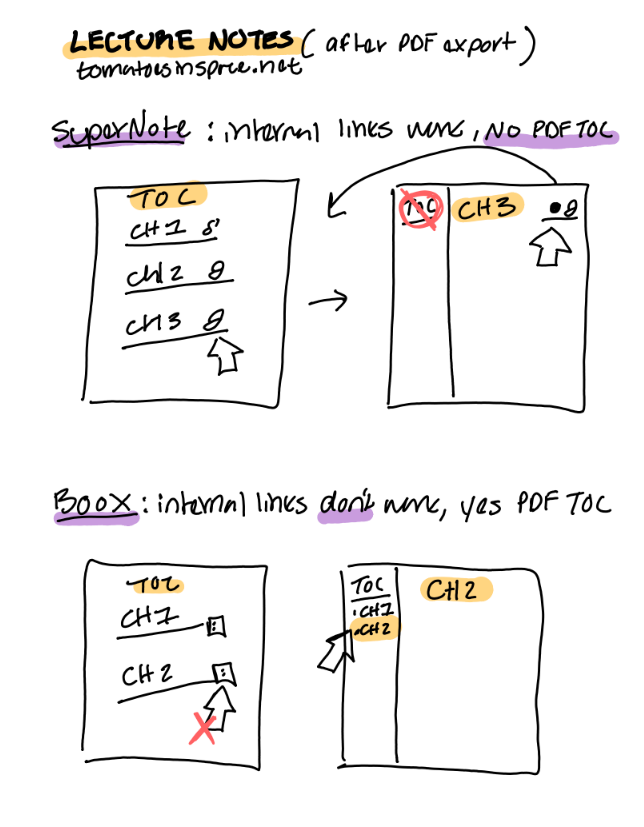
Research is Writing
These methods of note-taking, one where you are gathering information from readings or from lecture can become further useful in the advent of research. I do this by using the tag #ZK , #RS, and #LR. #LR stands for Literature Review, #RS stands for Research, and #ZK stands for Zettlekasten. I do this for any notes I take, on an e-ink device or in paper notebooks. They mean I must take some sort of action in relation to the note.
Literature Review (#LR) means that what I have paraphrased or written in my summary, can be used in a draft of a literature review. Research (#RS) means I need to do further research in relation to the note. Then, Zettlekasten (#ZK), means that there is an idea I want to put in my ZK system. The Zettlekasten system is where you link atomic, singular, notes together. You make these notes from the sources that inspire you to break down their arguments into useful singular ideas you can then remix for your own benefit. I will admit that this is a very involved process for coming up with unique thesis ideas and connections, but I enjoy it as a hobby and as a way to make sure particular ideas basic to me and my research are documented and elaborated on. When doing non-fiction writing, a lot of what we write requires citation and honoring others for their contribution into the world while you make your own. That is why I really enjoy the ZK system for research. While I do not go through the process often, the philosophy of it, fundamentally informs how I do research. Here is a zine I made last year explaining what a ZK is. Click here to print and fold!
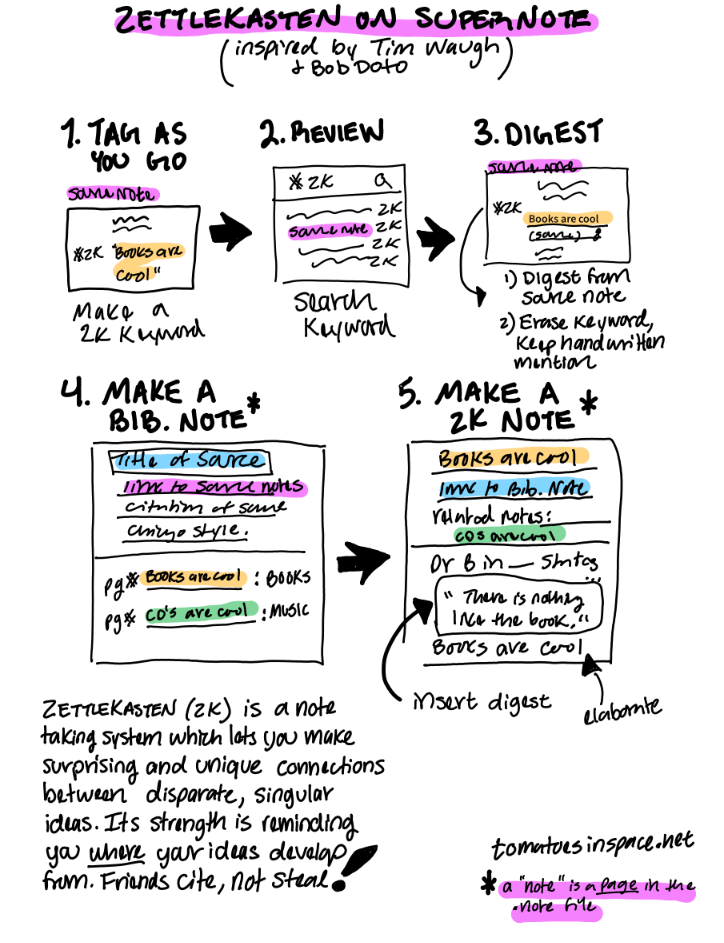
I am currently experimenting with creating and using a handwritten ZK system on the Nomad, and recommend Bob Doto’s A System for Writing for absolute beginners to the ZK system. If you have a Supernote device, Tim Waugh’s “Slipstream” Zettlekasten Supernote framework, is a good start for intermediate ZK users.5 Below is an illustration of how I use both Doto and Waugh together in the Supernote OS. The ZK can help write non-fiction work, or come up with new ideas, it cannot write for you.6
-
Create a Source Note. The Supernote is not meant to replace your computer, its like magic paper. This source note is the next best “authority” on the source itself. It is your ground “zero” in the Supernote system. Make sure to note what kind of source it is in your note and how you accessed it in the first place. Now, handwrite out passages, quotes, and summarize what you can from the source. You can even type it out from a previous list of notes you made elsewhere. Add page numbers/markers/timestamps/etc! As you go, make a keyword or “tag,” like #ZK to note which quotes or ideas you want to put into your ZK system.7 Lasso the #ZK, and insert the keyword to the page for later. This is but one way to flag what can be known as a “fleeting note,” which is a note that captures some idea you want to make an action on. Don’t erase that #ZK you’ve written by hand! Keep it so then you know when looking back on these notes, you wanted to or had, put this in your ZK.
-
Review your Notes. Once done taking notes on your source, you can global search your #ZK keyword. This essentially collects all of the #ZK fleeting notes you made. Select a source note that has the keyword and process what is on the page.
-
Create a Digest. Supernote has a quote collecting application called “Digest” and what it does is link the text to a source, but also allows you to insert that text in any note you see fit. See why having a source note is important? By doing this process, you can streamline the use of the Digest app.8 Make sure to include that actual sources page number, timestamp, etc. in the quote itself! This is key!! You can get rid of the keyword, but not the handwritten indicator! 3a. You can use the categories in Digest to assign what kind of phase this quote is in such as “sleeping” where you don’t know what to do with it, but wanted to digest it anyway9, or “fleeting” if you use Digest for other things besides for ZK. Also, you can’t edit these digests once they’re made besides who the author was, what category it is in, and any “expanded” notes made. So make sure the page number, the quote itself, and even the spacing is to your liking and accurate.
-
Create a Bibliographic/Literature Note. In a note file (real-time recognition), you will make an “entry” by adding a page where you specify: the title of the source, link to the source notes, and a proper Bibliographic citation in whatever style you use most. Then you record every instance you have clipped a quote from this source to make a main ZK note, make sure to link to those instances as well! You can style it like this: Pg # (title of ZK note) : keyword.10 Make sure the title of the ZK note is unique and a single idea. Lasso the unique title, create a link, then go to the note file where your ZK notes live and add a new entry.
-
Create a ZK Note. In a note file (real-time recognition), make an “entry” by adding a page where you specify: ZK note title (that is unique and signifies one idea), a link to the Bib. note, and then any additional links to other notes that relate to the note you just made (this is optional, but encouraged of course as your system grows).11 Doto is right in assigning each note an alphanumeric address. You can buy Tim Waugh’s system template if you’d like a visual representation. I suggest using both if on Supernote. Now you can insert the digest you just made into the ZK note, contextualize the quote, and elaborate on what it means for the idea that is the title of this ZK note.
Congrats! You did it, you made a ZK note! I suggest using the Bib. note to understand which sources are the most important to you (indicated by the number of entries) and browse the source notes you took. Do the same in the main ZK note file. Browse the links you made, especially the digests.
What Makes the Digest app special?
- You can reference the digested quote and use it in any number of entries, and always have a link to the source note.
- You can browse digests made (on the tablet or in the SN Partner app) and think up other ways the quote relates to other ideas.
- You can note which ZK notes use that quote specifically by providing the alphanumeric number and the title of that note in the text or handwriting annotations of that particular quote in Digest.
What would make the Digest app better?
- If you could edit the source of “manual entries” for easier use of digests.
- If you could take snapshots of text.
- If you can add to the annotations in the SN Partner app without using the tablet.
- If you could see which page that digest was used in, allowing us to the see the relationship between digests and the “headers” they are under.
- back-linking
So, that is my in-the-works process in how I do non-fiction writing. I primarily use whatever I write by hand to inform the final product, and the system I use to keep all those citations together is really a matter of how much time I have. The ZK Supernote system is just an experiment, I typically use Zotero, Supernote, and Kindle, to access my annotations and notes to then start mapping out and writing my work on the NA3C or SN Nomad. It’s all about experimentation!
-
Bob Doto, A System for Writing: How an Unconventional Approach to Note-Making Can Help You Capture Ideas, Think Wildly, and Write Constantly–A Zettlekasten Primer, 29. (Kindle) ↩︎
-
I can do a mini post on my annotation system in the future. ↩︎
-
Although, it is much worse when a file becomes “corrupted” because of a new update. Instead it is better to automate secure backups and to be aware when your device has a new update available and manually installing the update so then you have a chance to backup your notes. I experienced this specifically with Boox, where my notes would “duplicate” and “perfect” my strokes to look like square, etch-a-sketch renderings. It sucked!! ↩︎
-
I believe Ratta (the company that makes SuperNote) are developing a way to export the headings as a TOC. This is not possible as of writing, but will be such a game changer in how digital notebooks are made and persist as PDF’s. ↩︎
-
A quick note for more experienced users: Slipstream is good for its templates and Waugh’s interest in making it better. My current issue is that it is not beginner friendly, I believe it has some phrasing which can trip up beginners in how ZK can work for them. Such as emphasizing “fleeting notes” and not at all mentioning source/bibliographic notes. Or even neglecting the Digests function all together! How I detail my use of both is conscious of these missing elements. With that said, buy Doto’s book, then figure out what is the best method for you. Because I read Doto’s book and a few other authorities on the matter of note-taking and research, I knew how to change Slipstream to better fit my needs. I’ve detailed my use case for others benefit. ↩︎
-
Bob Doto, A System for Writing, 138-139. (Kindle) ↩︎
-
The tagging idea comes from Bob Doto (49, Kindle). The process of handwriting quotes, then selecting which ones you want to use for ZK by using the “digest feature” (which takes some fixing up the text), is a filtering system that stops you from just “capturing” all the quotes all the time. I think this is a good, slow process, that makes you really consider which ideas are most important for you to capture now. Re-reading and revisiting notes and their sources, are an excellent way to review your change of thoughts over time. ↩︎
-
I suggest this because while you can take Digests from documents, I personally do not read on the Supernote as it is not a great reading experience. I believe in that filtration process that comes with the friction of handwriting quotes out from the source itself. ↩︎
-
Bob Doto, A System for Writing, 27, 29. (Kindle) ↩︎
-
Doto, A System for Writing, 33. (Kindle) ↩︎
-
Tim Waugh, Slipstream v1.2, 8-11. ↩︎
Research, History, and Being a Story Finder
I feel as if being a historian is being a story finder. The archives—whether dust coated boxes or data centers—are full of narratives and assumptions inscribed and put upon them. The sources, by themselves, do not make up truth, it is the space between sources, what is left out, that makes a kind of truth. Especially when you put them against one another.1 No one person can write the same history as another, scouring and digging in the same archives. Like a puzzle piece, each person is gravitated to one piece, then another, all informed by the puzzles they have assembled before. Much like the fiction writer—a historian does best with practice and help from others.2 I reject the idea that history is a solo-activity meant to perish on words on a page. History is meant to be argued, grieved, celebrated, and questioned. The question I have now, facing my graduation and impending doom—has me feeling all the more brooding and philosophical. What good is history and art?
“But fiction is not the opposite of truth. Fiction means ‘created by imagination.’ And there is plenty of evidence everywhere in literature and art that imagination can get as close to truth as studious fact-finding can.” — James Alexander Thom3
Well, it takes community.
My favorite moments have been sharing the stories I find, or that find me. I have worked as a docent at a non-profit art gallery, and my favorite moments, are the stories the patrons share with me. I typically would start the conversation, ask for their opinion, and keep asking while trying my best to answer their questions. You learn more about people when you find that you’re both in search of a good story. Not a particularly moral or existential one, but one that makes you ask their name, and why they are here. It is these meetings that make me want to research more. Meeting people and getting to know them often introduces me to new ideas, thoughts and my favorite, reminders. To be a story finder is to puzzle over ideas—one will do. David Lynch is right about ideas.
“An idea is a thought. It’s a thought that holds more than you think it does when you receive it…It would be great if the entire film came all at once. But comes, for me, in fragments. The first fragment is like the Rosetta Stone. It’s the piece of the puzzle that indicates the rest. It’s a hopeful puzzle piece."4
One idea can act as a Rosetta Stone, the puzzle piece which shimmers a voidmirror. To use this Rosetta Stone, we rely on others to help translate these ideas as well. Scholars in history and physics have more in common with video game developers and home improvement bloggers than they might think. To be a story finder is to have what Umberto Eco calls “academic humility,” you can learn a lot from unlikely sources.5 Citation is the ultimate form of respect. We should cite others more, I know I need to. They look different but function the same: acknowledgments, thanks, dedications, features, producer tags—all speak the language of respect. Respecting that creation comes from accumulation, confluence, influence—to flow into.6 These reports of respect are part of research—to search again.7 A story finder pays their respects and reports back.
How does one tell the story they find?
This is a question I think stops me the most. In my research I have come across stories where I selfishly want to make up the rest. I want to fill in the unknowns, I want to expose its honesty. Burial by exposure. I love this carrion. I get a feeling, idea, thought, image, speech, something that tells me its more true in a piece of fiction. Other times, the story is so richly detailed that it cannot be told any other way than a non-fiction piece which revels in the unknowing of what we call the “past.” These lines can blur, and often do. The first step to finishing something is to get over yourself. To “become” requires either the shame of not being the thing you said you’d be—or, finding out after a while what you are. Either way, your actions define you. For instance, I was still a historian, a story finder, when I was a janitor. I found that I can be fulfilled doing work like that for the rest of my life, if my body would allow it. I became a historian of bureaucratic refuse. I scrap-booked trash, poorly taken instant film, petty work drama notes, candy wrappers, perfectly good stationery. I’ve made up stories of the stragglers. Those who stayed to work out in the gym, shit, and clean themselves up with DudeWipes™. There was a woman who stayed late every Friday for at least a month. Curling her hair, blotting the lipstick. As a janitor, no one sees you, but you see the things they leave behind, or are doing. A janitor makes a good historian. I got to listen to audio-books, audio-dramas, and podcasts. Imagination! Who can sing thy force? I found stories, and they found me.
How does one make the time?
Time cannot be wasted because it doesn’t care. Time is imagined. Often, when I say out loud, “I won’t read this.” I end up reading it anyway. But I meant what I said when I said it. That declaration of meaninglessness is important to keep getting the work done. You’ll find out what you do want to do quickly when you realize: you’re a great ape with no hair, small muscle, and an unfortunately large head.
What good is history and art?
They are good at capturing actions and persisting reactions. They don’t need to have a utility. No need to be good in quality or message. Their existence in the first place is enough. Much like how we are made by our own and others actions and choices. So, be nice to the janitor, wrap the gum.
-
See Trouillot, Silencing the Past: Power and the Production of History (1995) and introduction of Comics and the World Wars: A Cultural Record by Chapman, Sherif, Hoyles, and Kerr (2015) on conversations concerning the silences that enter the production of “history,” and by understanding that historical sources hold intrinsic and extrinsic narratives that shape their use in history and their use contemporaneously. A suggested methodology is to do close-reading, deconstruction, and cross referencing. ↩︎
-
For more information on the similarities and differences between historical fiction and non-fiction history (that line is blurry in exciting and frustrating ways), see James Alexander Thom’s The Art and Craft of Writing Historical Fiction (2011). According to Thom, a historian points backwards in time, and a historical novelist “stands beside you.” I think both are tools in a story finder’s toolbox. (40, Libby, EPUB) ↩︎
-
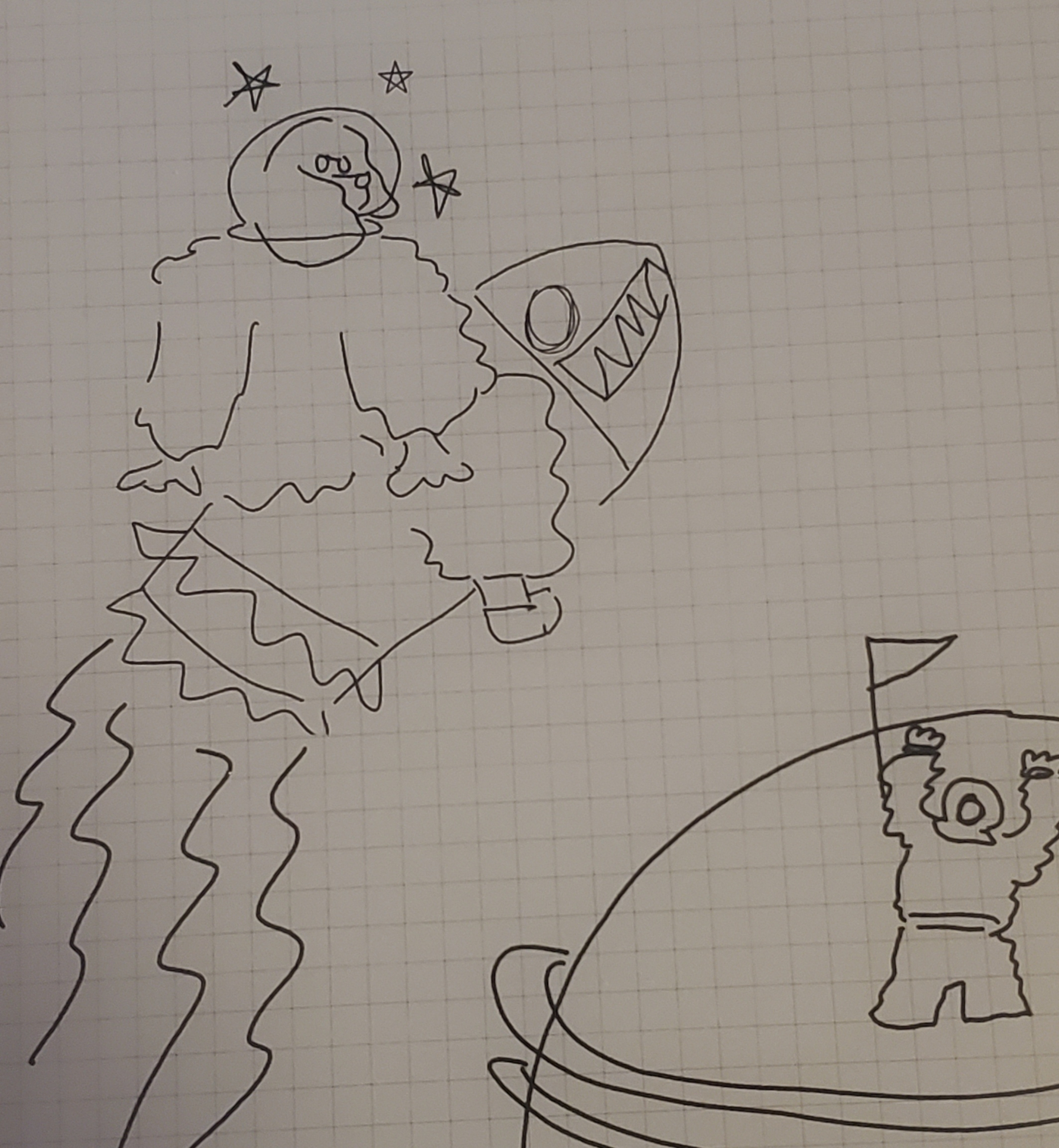
Thom, The Art and Craft of Writing Historical Fiction, 20. (Libby, EPUB) Also, this image doesn’t exist anymore! I drew it in my Supernote Nomad, and I didn’t want it there anymore. It is digital garbage, but archived here! In more digital garbage! ↩︎
-
David Lynch, Catching the Big Fish: Meditation, Consciousness, and Creativity. Audiobook. 16:00-16:45. (Chapter: Ideas, 23pg.) ↩︎
-
Umberto Eco, How to Write a Thesis, 190. (Kindle, 2015) ↩︎
-
Steven Johnson, The Invention of Air, 56. (2008) Johnson is discussing that “great men” don’t make history alone, “The whole notion of intellectual circulation or flow is embedded in the word ‘influence’ itself (‘to flow into,’ influere in the original Latin).” I recommend this book if interested in the history of science. ↩︎
-
Thom, The Art and Craft of Writing Historical Fiction, 79. (Libby, EPUB) ↩︎
Minding the (Analog and Digital) Gap
One of the worst afflictions to have is the ability to argue with yourself into oblivion. I’ve done that exact thing on the least important of all subjects: note-taking. Well, I don’t believe note-taking is useless, but given the sort of renaissance on the topic, I know I am not the only one. For instance, what to do about the seeming GAP between taking analog or digital notes?
Some choose the extreme. They go “all in” on either paper or digital tools, others, (and I believe is the majority) frequently cycle through note-takings current and past technologies and (hopefully) just choose the ones they need the most in their situation. I am unfortunate enough to go down the many, many rabbit-holes—it is practically a burrow—on how to take good notes on a variety of mediums, for a variety of purposes. Some good authorities on the matter are actually paper-enthusiasts—@Annahavron who runs the blog Analog Office, and Rachelle from Rachelle in Theory who has a course I wish I could spend money on just for the curiosity of it. I find the advice I learned from them to be solid in understanding this gap, but leaves me with some questions. Especially when that gap between digital and analog is not so “obvious.”
Three Steps to Mind the Gap
Step 1) Its a Brainstorm, not a Brain-Dribble
I believe Rachelle is right when she so often talks about working through something on paper first. In a more recent video titled “Paper for Thinking, Digital for Storage”, Rachelle says that it may just be best to use paper for any initial ideas or plans. Digital is good for storage. I agree actually. I tend to brainstorm by handwriting, either in my Traveler’s Notebook or in my E-notebook, the SuperNote Nomad. Havron suggests something similar, where she suggests using digital tools for finite things, and paper based tools for seemingly infinite things. For example, paper for brainstorming an idea, the limits of the page makes us think deeper on the task. Digital is great for keeping things you know are happening, like a calendar appointment, or due dates on projects. Things like that.1
While these posts from Havron and Rachelle in Theory are more recent, I myself have only come to the realization after (literal) months of rumination, that the best way is the one with least resistance. For example, I use my Nomad to take meeting notes for work. Once done, I go over these notes and create a list of to-dos, reminder’s, etc. in my task management app. I then erase these notes once I’ve processed them. I do this because I hated taking these important notes on analog paper, and I could never parse what I meant, this process leaves less paper wasted and makes me process my tasks to then get on with my work projects.
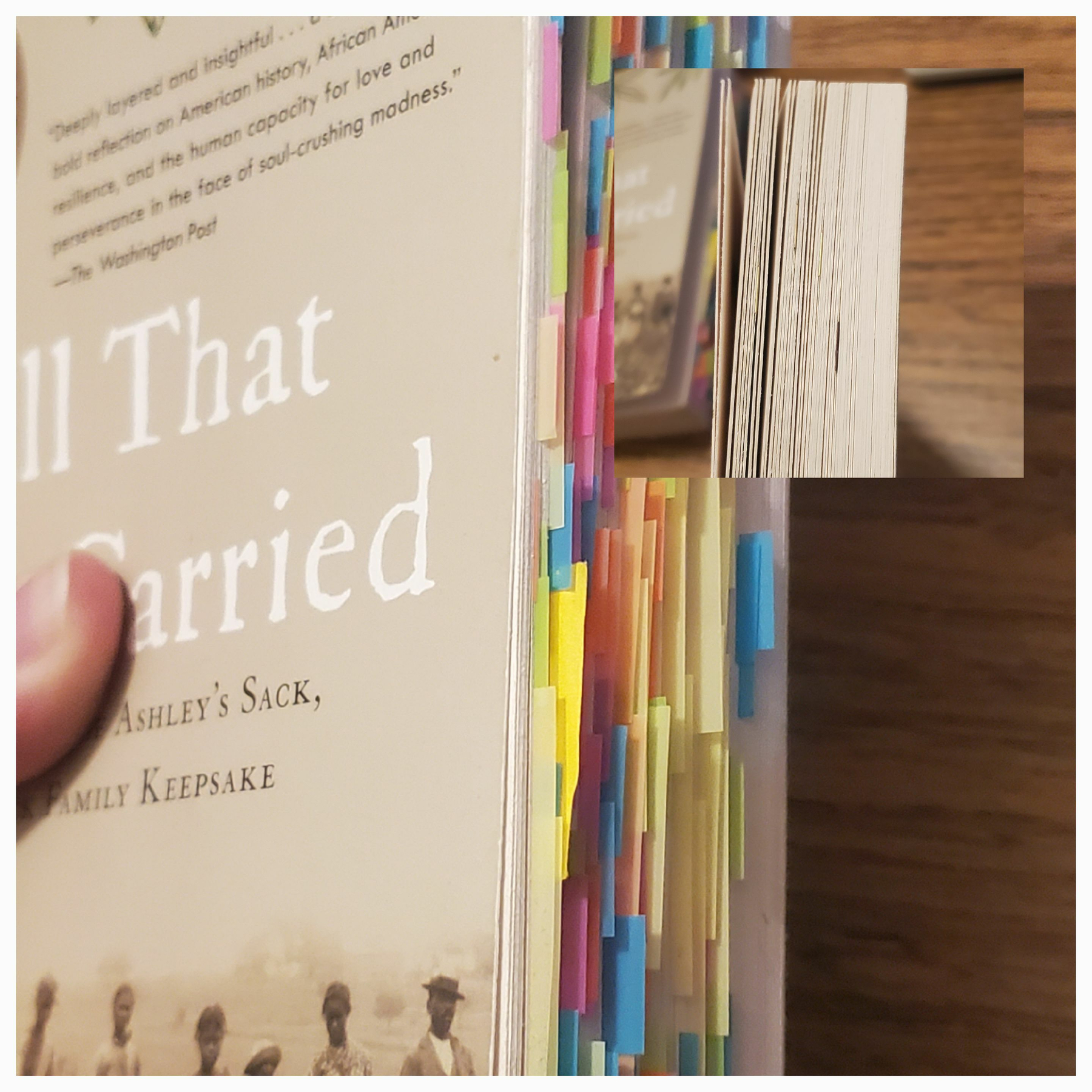
Another example is my reading notes. I take my reading notes on the Nomad because it is often for my seminar classes. Even if I do not read the book in full, I have lots to say anyways, because I can better remember key terms, examples, and arguments with this system. Before I used to use MANY colored tabs, I’ve endearingly called my most favorite books my colorful porcupines because of this. Now, I just mark the chapters with BookDarts, and annotate with pencil in the margins, and put most of my own thoughts in the new (.note) file on the Nomad.
Step 2) Simplicity, Simplicity, Simplicity
If I were to sum up most of my troubles, it is not knowing what simplicity “actually” means. Simplicity is the path with the least resistance. Meaning purposefully choosing the method in which I know just works. The beauty of this step is that it is inherently individual to everyone. We all do things in a particular way, no need to change it, if it works!2
If you know what “#RS" or “#LR” means in your notes, do not change it. If you require a new obsidian vault for a new project, do not listen to everyone who says you need “one vault.” Same for notebooks. Do the bare minimum you need to keep going. No need to “revamp” the system. If anything, it means you may be avoiding the tasks you must do. I am a master at this secret technique called “But what if…" I am now trying to be good at “I might as well…"3
There are many “options” out there that make us feel as though we may not be getting things done fast enough or aesthetically enough. I love experimentation, but, experiments are best done when there are few variables.
This step is to keep the “woops I collect [insert stationery/electronic item] now” kind of mentality. Get creative, and have fun with the things you do have, and do trial runs at appropriate times. Ask your friends (better if in person!) how they go about doing things.
I asked some of my friends in seminar how they take reading notes, one of them kept a separate notebook and I was intrigued but also thought it may be a waste of time. Now that I have tried it out, the extra amount of time writing out important sentences plus my own thoughts, is worth it for how much more I get out of these dense historical works. While I miss my colorful porcupines, I have changed my annotating to reflect the more confidence I have now as a historian in training.
Step 3) When in Doubt, Write it Out
If your keyboard is right there, use it. If there is pencil and paper, use it. The beauty is that you can just move the notes where they can be more convenient later. I’ve learned this while I was experimenting with too many variables, and it helped me figure out in the end, where I should try and take notes or do certain tasks. If there is a fundamental flaw in the system, just putting it down is the first step to understand what you might be able to change to make the next time easier.
I have a bad habit of wanting to fix something the moment I think it is broken, thus derailing what was going to be a two hour reading session or work session to a “tinkering” one. I still struggle with this, but, I’ve become so busy that doing this would make me fall wayyyy too behind. To tell my brain I know it is screaming at me, I use the “someday maybe” list I have digitally in my task management app, and put it in there, maybe with a due date to review at a time I know I will not be as busy as I am currently. 4 So, write it out, then ask yourself if it really needs addressing NOW, or if this is a limitation you must deal with.
E-CODA
This brings me to the ambiguous “gap” between analog and digital tools, E-ink or E-paper technology. While most people know about e-readers such as Kindle, Kobo, Pocketbook, Nook, etc. Many don’t really know about its e-notebook counter part. At least, not six years ago when I got my first one. E-ink is ambiguous because it is digitally-born and my handwritten notes become digitally born as well—thus—easier to integrate in many workflows that require an end product to be, digital. There are some things it cannot beat paper at, such as its physicality, which allows for permanence and privacy that is unmatched. I use these e-ink tools to produce work that will be digital anyway. I personally hardly use it for anything I deem a hobby or creative. 5 But, I’ve only realized that with trial and error, there aren’t many digital and analog uses of e-notebooks promoted online. In-fact the SuperNote website has a revolving animation that suggests it can replace your: sketchbook, planner, journals, and notebooks. For myself, that didn’t work. So, how do I use this niche technology that is an e-notebook?
- To take class or reading notes
Why? I hate fussing with stationery when it comes to notes I would like to reference later on. I would get distracted with ink bleeds, smudges, and god forbid, my notes getting out of order during a lecture. With reading notes, I can attach my handwritten PDF in my reference manager of choice and have it synced and easy to reference wherever I may be working. No need to scan pages.
- To experiment
Why? Because hoarding stationery is a hobby of mine I am trying to not indulge in anymore. I can experiment with certain layouts, systems, etc. without having to spend more money, just to abandon it (such as the hobonichi layout). One big caveat is that e-ink products are expensive tech, so who is saving money, really?
- To take a break for my eyes and back
We know why. I look at screens often, and being able to read a digital book (on my Note Air 3C) natively in the Zotero application, is a life saver. The same thing applies to the notebooks I carry. I now carry only two notebooks, a Traveler’s Notebook and one in the passport size.6 The rest find a home on my SuperNote Nomad.
I think the expense of time and money in reshaping how e-ink fits into how I work made me feel that they had to completely replace all paper I will ever use. That is simply not the case. It is a luxury to be able to use them, not a requirement, but I do think of them as indispensable to the work I do. They help me mind the gap.
How do you mind the gap?
-
Anna Havron, Reader Question 10: Personal Productivity Analysis Paralysis, Analogoffice.net. analogoffice.net/2025/08/2… Accessed, 28 Jan 2026. ↩︎
-
Anna Havron, Reader Question 1: Paper as a Read Later App?, Analogoffice.net Accessed, 30 Jan 2026 Havron echoes this in various places on her blog, but the very first “reader question” does a good job summing it up! ↩︎
-
Check out these videos here about this! How to Manage Multiple Interest - Odysseas and Time Management - Amy Wang ↩︎
-
And let me tell you, I am booked out till August, lol. But, do look into David Allen’s “Getting Thing’s Done” it is “tool agnostic” and beyond helpful for me! ↩︎
-
When I do have some creative inspiration, with nothing else on me, I’ll just migrate out whatever I wrote in the one physical notebook I keep everything. ↩︎
-
I may do a post about them in the future. ↩︎
Craftsmanship & Niche Technology
A lot of the research I do is influenced by my belief in what imagination can do. I love science fiction, history, and especially the imaginative power of the arts as a whole. It is why—unsurprisingly—I like niche technology. The beauty of niche technology is the “taking back” of technology as a skill and art form, it is both a refreshing of old tech, and a curiosity that challenges technological determinism with craftsmanship. Niche technology to me means, taking seemingly “old” or obsolete technology like the famous iPod, Alphasmart Neo 2, or Nintendo 3DS, and saving it from becoming e-waste. Another way of viewing “niche tech” is contemporary, focused-based tech, such as E-ink or open source projects going back to the foundations of dedicated single-use technology. These two examples of niche tech are often used by those who follow Cal Newport’s idea of digital minimalism. The idea of using technology deliberately and if possible for a single purpose. I’ve skimmed Newport’s book Digital Minimalism, it is a rather popular idea for anyone and everyone who is either: One, wanting to be more productive, or two, wanting to be more present. I tend to see conversations about the best note taking applications, the best e-ink tablets of such-and-such year, or even what is the best planner and what should people put in their “journaling ecosystem.”1
The most concerning aspects of these communities is the unhelpful conversations of “over-consumption” and also the blind belief in “productivity.” Particularly in the analog stationery community (notebooks/pens/stickers/etc) there is a rather mind-numbing conversation about “overconsumption” a term I am sure other hobby spaces have felt the presence of. The issue to the conversation is that there is not enough on what people make. Hobbies are good to have, but it is a shame that most media about hobbies, revolve around reviews, hauls, and purchases, and not enough on what people make. Overconsumption is the system at play here, it is designed to make companies profit, it is not new, the system is and has always been “overconsuming."2 The remedy to not just unhelpful and bad posts and “overconsumption” is shifting these hobbies to center conversations that are about doing and not just owning. The most optimal review is one where it is not even focused on the object itself. Being mindful of what we own is but the first step, the next step is doing.
This brings me to productivity. The idea that we need to output consistent work on a regimented basis, it actually makes perverse the idea of doing. Which means, people using the excuse of “increased productivity” to unmindfully purchase and use non-tested tools/systems. Or even, believing they are doing something in the act of that blind-yet-hopeful purchase. The classic procrastination tango. I’ve done it countless times, and it is also one of the ways in which I feel I have wasted money. Not overconsumption, we are always overconsuming (and I do think that should change) but I am investing in an idea that will never be: perfection. That is a waste. Perfection is the issue at stake here for both “overconsumption” and “productivity;” perfection is the antithesis of the future. If we can only imagine ourselves in the future as perfect, there is no real way of progress. We are missing out on a lot more.
I love the “seasons” of a year. I actually often use things more when I put my life in that way of thinking. Some things are picked up, other times put down. I only truly look forward to seasons. When it comes to stationery, that is one way I have been consistent in documenting my life and using up the items I’ve purchased. When it comes to the electronic devices I use, those are for experimentation and skill-building. But I try to keep an element of humanity in all of them. I use ‘em up. There was a great conversation on how “human” eink technology is, which I agree with. While they discuss how e-ink is a technology that aims to blend in rather than stand out, all while bridging the gap of digital output and analog thinking—it is actually human because someone thought to ask, what would digital paper look like? Community led-design is pivotal in developing solutions that are impactful, considered, and human. It is the designer going to the community and asks “what problems do you wish to solve” instead of identifying the problems for them and finding a solution. The problems are truly considered from those who experience them. The seasonality of life requires various technologies to get certain things done, to answer the problems that arise throughout the year. To be with our loved ones, and to be with ourselves. These technologies are tools, we must be craftsmen of our own lives to be skilled enough to use them.
I’ll end with an anecdote of a tinkerer I admire. On the subreddit of r/writerDeck, you will find the many curious creations by Un Kyu Lee, an innovator in the space creating dedicated, unique devices towards writing, what he calls the Micro Journal. He made the Micro Journal for himself, but has since developed various versions which have come from the input of the community. Lee’s ability to merge his love of the typewriter form as well as the needs of contemporary writers to use digital word processors away from the distraction found on the internet is unparallel in comparison to Apple-clone’s surrounding e-ink and writing solutions today, like Astrohaus’ FreeWrite or the ReMarkable team. Unlike them, he provides the Micro Journal, with open sourced files both in printing and gathering the resources of the hardware as well as the software he has made. For limited runs Lee will make a custom Micro Journal for you and ship it from his home and tinkerspace in Italy. Recently, in a post ironically titled “Looking to buy my dream writerDeck” Lee laments that he has been dejected to see Micro Journals he has made be immediately put up for sale once they have been delivered. Lee, feeling cynical, “farted around” and made an ironic, sort-of basic “dream writerDeck” with an LCD screen that closes onto a ortholinear keyboard. This ironic tinkering lead to people continuing the cycle he once thought was encouraging, people going in the comments of this post with the “meta-ironic” writerDeck he made, stating “this is my perfect writer deck.” When thinking about the work Lee puts into his creations, the efforts he makes in detailing the process of making it, and even providing an accessible labor for those who do not have the necessary tools to make the Micro Journals themselves, it is such a sadness he has to witness his craft get dumped down the toilet of the perfectionists and the over-productives of the world. Niche technology is overwhelmingly lucky to have such dedicated craftsmen both new and seasoned, working on producing solutions together. We must foster a culture that respects the craftsman, especially the craftsman invested in open tech and community directed design. No one seems to know the gifts of conscious and inspired creation, they can hardly chew it as they gulp it down with the fizzy stuff of dopamine and novelty.
Cutting the Red Ribbon - Experimenting!
I’ve been driving myself mad by not knowing where to start with my mountain of blog drafts and ideas waiting to be edited or even started. I thought I had to make the best “first blog post ever,” but it turns out, I want this to be more casual than anything else. I want to experiment. I want to write more as a habit (one of the goals of this blog actually) , and while I have the urge, material, and the time—I keep getting in the way of my own goals. I watched a great video recently that introduced me to the idea of this quadrant of ambition and curiosity, originally defined by Anne-Laure Le Cunff where basically, we can get trapped to perfectionism, escapism, or worse cynicism. These are feelings I often feel, but was interested in what “experimental” mindset would mean to me.

I like the idea of maintaining an experimental mindset as much as possible. From my own experience, it really does boil down to habit and framing of mind. Experimenting means being able to abandon what I think is proper and be okay with failing, and maintaining (my often overflowing) sense of creativity. I am the only one who cares. That is a mantra I’ve been saying throughout my graduate degree thus far, and I mean to keep it till I see myself having fun along my way to the finish line.
With that, I have had a TIME trying to get my head wrapped around this particular issue I am having. Planning. Journaling. Researching. Notetaking. My favorite topic and thing to do is to research various notetaking methods and processes. It has become my number one way to procrastinate. I am stagnating! And admittedly, most of my drafted blogs will not see the light of day outside of my Obsidian Vault because it is simply me arguing on the merits of analog versus digital notes, among other things. I am determined to experiment. It may be good to use this blog as an accountability buddy, a quick check-in, plus any other things I find myself wanting to write about. Thanks for attending this red-ribbon cutting!
Ciao, Tariq